

Bring Out Lines and Surface Features
Tamiya Panel Line Accent Colors are designed to bring out recessed details, panel lines, seams, and other surface features on scale models. Create anything from high-contrast panel lines to subtle shadows and realistic weathering.
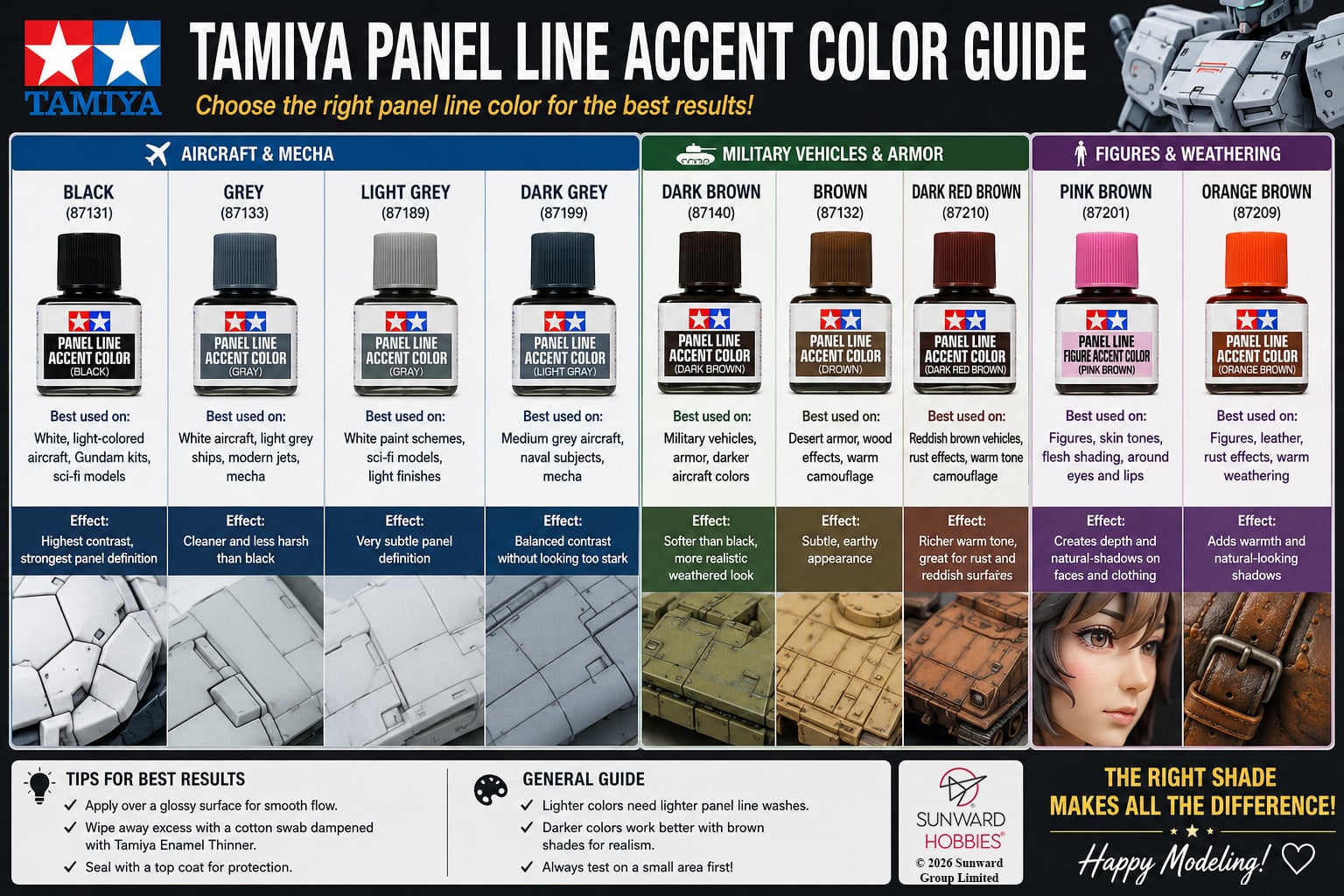
This comparison chart provides a quick reference for the Tamiya Panel Line Accent Color range, including Black, 87133, Light Grey, Dark Grey, Brown, Dark Brown, Pink Brown, Orange Brown, et Dark Red Brown. Each shade can produce a different effect depending on the model’s base colour and subject. Lighter greys can provide subtle definition on light finishes, while browns are useful for armor, military subjects, and warmer finishes. The figure-oriented colours also provide additional options for adding shadows and depth to figures.
Frequently Asked Questions
Which Tamiya Panel Line Accent Color should I use?
It depends on your model’s base colour and how much contrast you want. Black creates strong definition, while grey and brown shades generally produce softer results.
Is black always the best colour for panel lines?
No. Black can create a very pronounced effect. Grey, Dark Grey, Brown, or Dark Brown may look more subtle on certain paint schemes.
What’s the difference between Grey and Light Grey?
Light Grey provides more subtle definition and is particularly useful on very light finishes. Grey offers slightly greater contrast while remaining softer than Black.
What are Pink Brown and Orange Brown used for?
These warmer shades expand the range beyond traditional panel lining and can be useful for figures, flesh tones, leather, warm finishes, and weathering effects.
Tamiya Panel Line Accent Color Products
- Tamiya Panel Line Accent Color Black 87131
- Tamiya Panel Line Accent Color Brown 87132
- Tamiya Panel Line Accent Color Grey 87133
- Tamiya Panel Line Accent Color Dark Brown 87140
- Tamiya Panel Line Accent Color Light Grey 87189
- Tamiya Panel Line Accent Color Dark Grey 87199
- Tamiya Panel Line Figure Accent Color Pink Brown 87201
- Tamiya Panel Line Accent Color Orange Brown 87209
- Tamiya Panel Line Accent Color Dark Red Brown 87210